
Applying to NAPEG and Engineers Yukon
As of April 11, 2026, all professional geoscientist applicants are required to use the competency-based assessment (CBA) process when applying to APEGA. Read more about this change.
If you started your application before April 11 and have questions about the previous process, please contact [email protected].
If you are applying to the Northwest Territories and Nunavut Association of Professional Engineers and Geoscientists (NAPEG) or Engineers Yukon for registration as a professional member or member-in-training, and you are not already registered in another Canadian jurisdiction, you must first submit an initial application to the respective association.
NAPEG or Engineers Yukon will then send you a verification code that you’ll enter into APEGA’s myAPEGA portal to complete the full application process. The verification code will enable you to submit an application without payment to APEGA.
Applicants who are already registered in another Canadian engineering or geoscience regulatory jurisdiction must apply through the respective association’s interprovincial mobility process instead.
Step 1: Submit Your Preliminary Application
You may apply to NAPEG or Engineers Yukon as a professional member or member-in-training. Review the requirements for each category before proceeding to ensure you select the appropriate application type.
Read About NAPEG Application Types Read About Engineers Yukon Application Types
Once you determine your application type, submit your preliminary application for registration directly to NAPEG or Engineers Yukon following the process outlined by the respective association.
Step 2: Receive a Verification Code
Once NAPEG or Engineers Yukon has received your application and the application fee, it will provide you with a verification code to complete the full application process in myAPEGA. APEGA does not issue verification codes.
Step 3: Apply Through APEGA
After you receive the verification code from NAPEG or Engineers Yukon, complete the following steps.
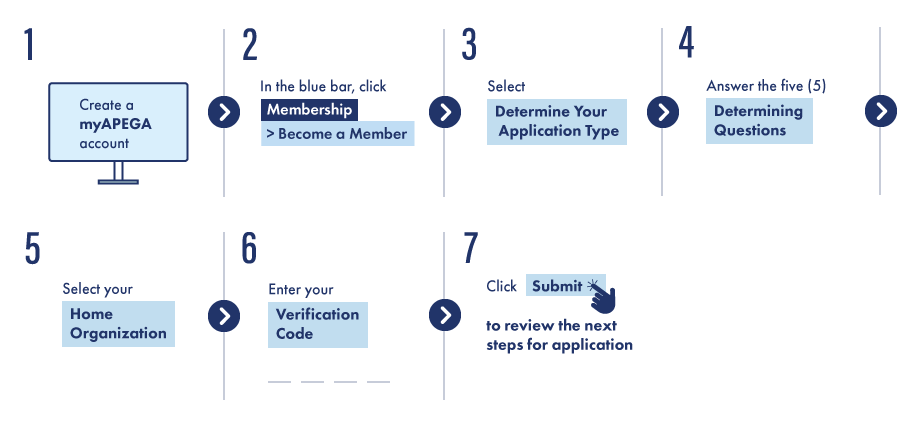
-
- Create an account with myAPEGA. You cannot start an application without completing this step.
- After logging in to myAPEGA, click Membership in the blue bar, and then Become a Member.
- Click Determine Your Application Type.
- Answer the five questions given to identify which type of application to complete.
- When prompted to select your home association from the drop-down menu, select either
- Northwest Territories and Nunavut Association of Professional Engineers or Geoscientists
or - Engineers Yukon*
*Limited licensees can select only Engineers Yukon - Enter the verification code you received from your home association.
- Click Submit.
If you have any problems with the verification code, please contact the association you received it from.
If you have any other questions, email [email protected].